Five panels. Every number read out of the build.
Seventeen sliders and two switches, in one OpenFX node. Each panel below is drawn from the shipping plugin — the defaults are its defaults, and every knob sits where the plugin puts it.
Skin, at a glance
Colour selection and softening in DaVinci Wide Gamut / Intermediate.
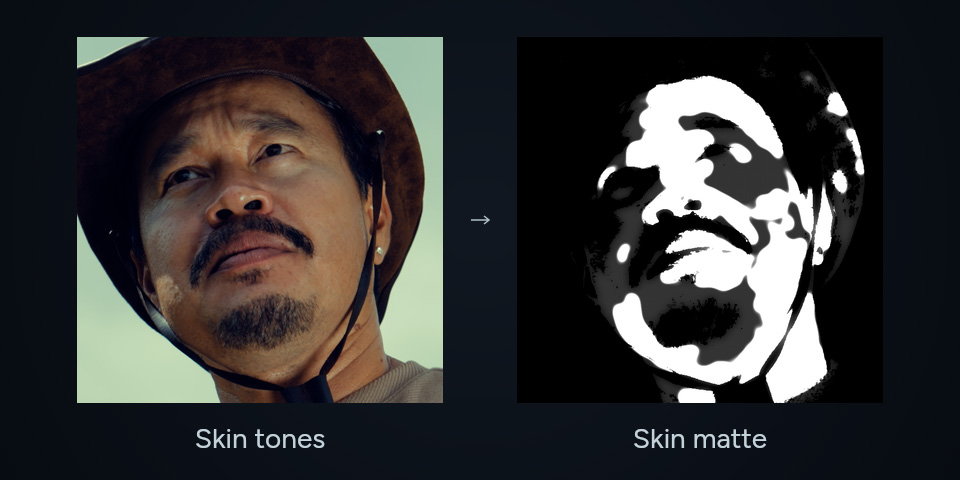
Skin
Select skin tones
Preview skin-tone selection as a black-and-white matte. Adjust hue, range, highlight inclusion, clean and smooth.
Learn more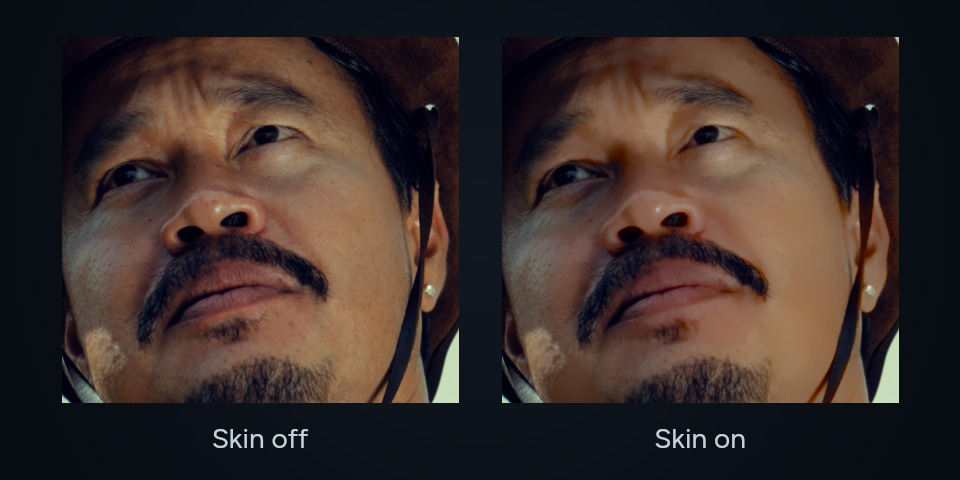
Skin
Retouch and soften
Compare Skin off and on using strong Retouch and Skin Soften settings on the same frame.
Learn more
It finds the skin. You never draw a mask.
A colour-based hue window selects skin-like colours, with range, highlight allowance, clean and smooth controls. It uses colour rather than AI, face detection or tracking. Use a DaVinci Wide Gamut / Intermediate timeline and check the mask in the viewer.
Show Skin Mask puts the matte on the viewer, so you set the window by looking at it.
Grade the face. Leave the room alone.
Exposure, warmth and saturation applied only inside the mask, so a face can be lifted without dragging the wall behind it. Tone Unify pulls uneven patches toward each other rather than flattening the whole face to one value.
All four sit at zero on load — the node does nothing until you ask it to.
Blemishes go. Pores stay.
Retouch runs at a size you set, and Texture decides how much of the original skin detail is written back over the result — which is the difference between a retouch and a plastic face. Blemish Detect narrows the work to the spots that actually differ from the skin around them.
Retouch Texture defaults to 0.50 and controls how much original skin detail is retained.
Softening with a size, not a blur.
Skin Soften smooths uneven skin colour. Adjust its strength and use Soften Size to set the radius. Check the result and fine texture at your delivery resolution.
One knob over everything above.
A single dry/wet across every control on this page. At 0 you are looking at your untouched input — which is how you judge the work — and anywhere between lets you dial the whole node back without unpicking a single setting.
Global Blend ships at 1.00. Status reports the licence state; there is nothing to type.
Buying the bundle? Film Pro's ten panels are here ›